Hi Syncro Community 
This month, Syncro introduces significant expansions to our RMM capabilities with the launch of the Linux Agent, automated Microsoft 365 license billing, and enhanced visibility through reporting upgrades.
In This Release
- Linux Agent Open Beta: Support for Ubuntu, RHEL, and Debian
- Microsoft 365 License Billing: Automated Invoicing for Microsoft SaaS (Early Access)
- Syncro Cloud Backup: EU Region Support and GDPR Tools
- Microsoft 365 Onboarding: New Enhanced Authentication UI
- Reporting Upgrades: Dynamic Exports and Executive Summaries
- Quality of Life: Stability improvements for Mac and Assets
- Coming Soon: Roadmap Preview
- Release FAQ: Quick TLDR for MSPs and IT teams
- Stay Connected: Sign up for the February Release Webinar
View the full February 2026 Release Notes for a complete list of bug fixes and back-end updates.
 New Features Released in February 2026
Linux Agent Open Beta
The new Linux Agent brings RMM functionality to critical server and workstation environments. This enables partners to standardize their monitoring and support workflows across Windows, Mac, and Linux assets from a single console.
Core Capabilities:
- Robust Scripting: Deploy and manage full Bash scripts with native module support for alerts and ticket creation.
- Comprehensive Monitoring: Gain immediate fleet visibility today through hardware specifications and offline presence alerting, or use our robust scripting engine to trigger custom RMM alerts for critical system metrics with built-in disk and memory monitors coming soon.
- Secure Remote Support: Initiate one-click Splashtop remote desktop sessions directly from the Syncro console for full GUI access, or leverage integrated scripting for seamless troubleshooting that never interrupts the end-user.
- Broad Distribution Support: Supports standardized, silent deployment across Ubuntu, RHEL, and Debian-based systems.
Microsoft 365 License Billing: Automated Invoicing (Early Access)
Syncro is expanding its Universal Billing engine to include direct integration with your synced Microsoft licenses. This feature streamlines the invoicing process by automatically syncing license counts to your recurring invoices, ensuring you never miss a billable seat.
Core Billing Automation Capabilities:
- Real-Time License Sync: Automatically detects Microsoft 365 license changes, such as adding new Business Standard seats or removing licenses for terminated users, and adjusts the next recurring invoice accordingly.
- Flexible Quantity Options: Choose to bill based on total licenses owned or only those currently consumed by active users.
- Customized Client Pricing: Set unique per-license rates for individual clients directly within their recurring invoice settings.
- Revenue Recovery: Eliminates the need for manual reconciliation between Microsoft 365 and Syncro, reducing administrative overhead and billing errors.
 To sign up for early access, click here.
Syncro Cloud Backup: EU Region Support & GDPR Tools for Microsoft 365
We have expanded our Microsoft 365 Cloud Backup capabilities to support international data residency requirements and privacy regulations.
New Compliance & Data Residency Features:
- Azure EU Region Support: Customers can now choose to back up and store their Microsoft 365 tenant data within the Azure EU region to meet local data sovereignty needs.
- GDPR Purge Requests: Syncro now supports specialized purge requests for individual users across all tenants, ensuring MSPs can stay compliant with Right to Erasure (GDPR) mandates.
Microsoft 365 Onboarding – New Enhanced Authentication UI*
*Available via Team Plan
We have replaced silent authentication failures with a responsive and informative UI designed to guide users through the M365 integration process.
Actionable Troubleshooting Guides:
- Permission Verification: Clearly identifies if an authenticating account is missing from the required “Admin Agents” group.
- Relationship Checks: Detects if a CSP tenant lacks the necessary customer relationships before allowing the integration to proceed.
- MFA Compliance: Alerts technicians if an admin account was not properly prompted for MFA, ensuring secure connections.
Reporting and Data Extraction Updates
These updates close critical reporting gaps by delivering higher-impact data for billing accuracy and executive communication.
- Patching Enhancements: Now includes granular details on patching status to better demonstrate proactive security during QBRs.
- Dynamic Asset Exports: You can now export your customized Asset list view directly to a CSV, matching the specific columns and filters you have applied.
- Billing Reconciliation: The Pending Ticket Charges report now includes ticket subject and service item context for faster revenue verification.
 Quality of Life Updates
We’ve implemented several stability and performance improvements across the platform:
- Asset Management: Improved stability of the Syncro Live Agent Runner Service by reducing WMI errors in Backgrounding Tools.
- Mac Support: Enhanced reliability for Mac agent online status reporting and auto-filled contact forms.
- Scripting: Fixed an issue where manually scheduled internal reboot scripts could not be canceled or removed.
- Ticket Automation: Mailbox settings now correctly apply designated Issue Type and Ticket Status values upon ticket creation.
- Enhanced Asset Patch Visibility via Syncro API: The Syncro API now supports asset patch data, allowing you to easily track which patches are recently installed or missing.
 Coming Soon: Roadmap Highlights
Beyond this month’s active updates, Syncro is continuously developing new tools to automate your most complex workflows. The following features are currently in development to further enhance your security posture and billing efficiency in the coming months.
-
Microsoft 365 Baseline Expansion: Automated assessment of 75 critical security settings aligned with CIS benchmarks to prevent configuration drift.
-
Payments: Integration of Stripe ACH to broaden your payment processing options.
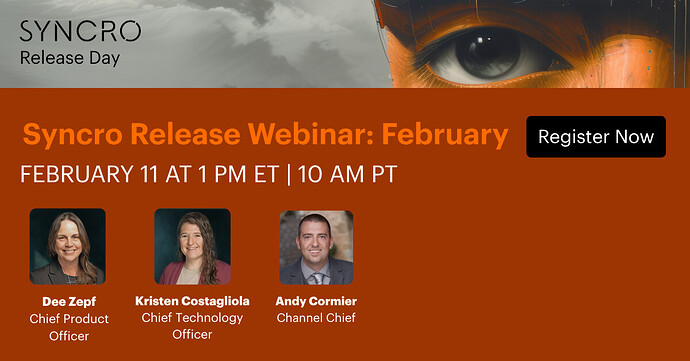
Join our February Release Webinar on February 11th at 10 am PST to see these features in action.
Plus, you’ll get a first look at the latest Syncro enhancements designed to help you:
 Streamline technician workflows
Strengthen security and compliance
Unlock deeper insights through reporting
Simplify your day-to-day operations
We’ll share what’s coming next on the roadmap, with new capabilities built around your feedback.